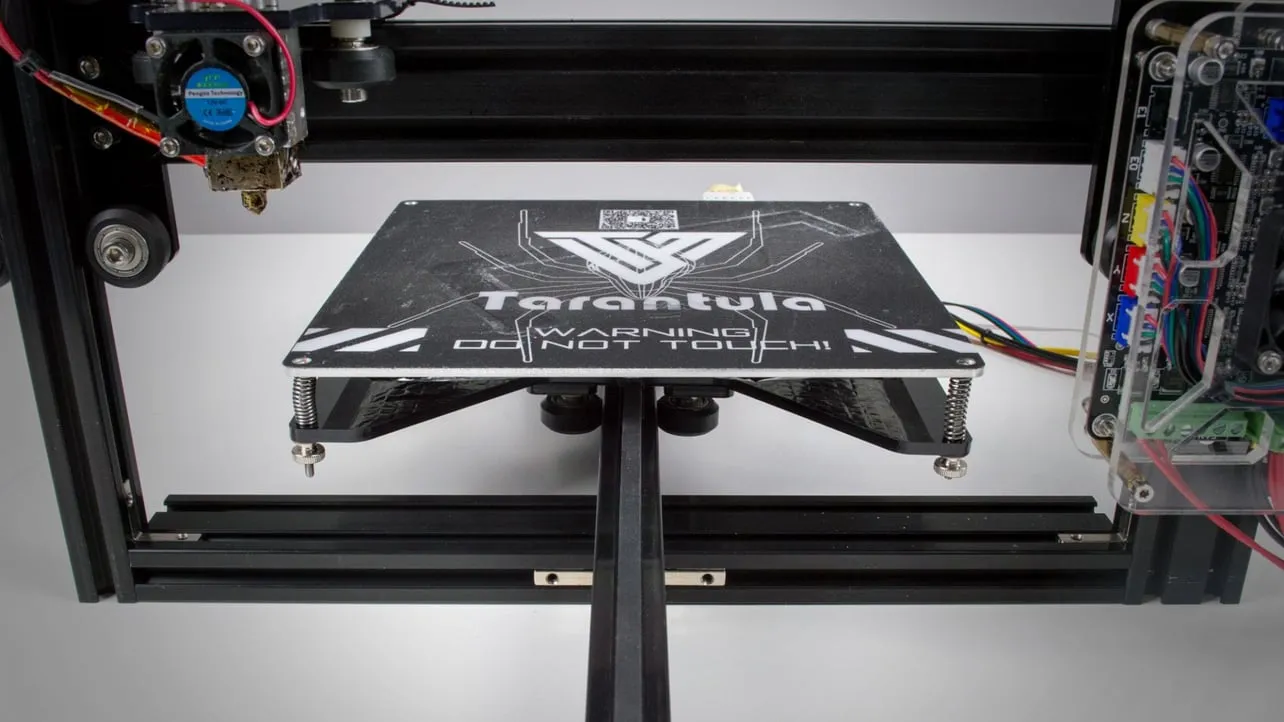
Why Tevo Tarantula Heated Bed Replacement Matters
The Tevo Tarantula, a popular entry-level 3D printer, relies heavily on its heated bed for successful prints. The heated bed ensures that the first layer of your print adheres properly to the build surface, preventing warping and improving overall print quality. Over time, however, the heated bed can degrade due to wear and tear, leading to various issues that necessitate replacement. A functional heated bed is crucial for maintaining print quality and avoiding frustrating print failures. This guide provides essential tips and instructions to help you replace your Tevo Tarantula heated bed effectively, ensuring your 3D printing endeavors remain smooth and successful.
Common Issues That Demand Replacement
Several signs indicate that your Tevo Tarantula heated bed needs replacement. Recognizing these issues early on can save you time, filament, and frustration. Ignoring these problems can lead to failed prints and potentially damage other printer components. Addressing these problems promptly is essential for maintaining the reliability and performance of your 3D printer. Here are the most common problems that necessitate a heated bed replacement.
Uneven Heating

Uneven heating is a prevalent issue where some areas of the bed reach the target temperature, while others remain cooler. This can lead to inconsistent first-layer adhesion and warping, especially with larger prints. If you notice that your prints are lifting off the bed in certain spots or that the first layer isn’t adhering evenly, uneven heating is likely the culprit. This problem affects the overall quality of your prints, leading to failures and material waste. You should check with a thermal camera or by hand to ensure proper heat distribution over the surface of the heated bed. If you detect temperature differences, then replace it immediately
Damaged Heating Element
The heating element is the heart of your heated bed, and if it’s damaged, the bed won’t function correctly. Damage can occur from physical impact, electrical shorts, or simply from the element wearing out over time. Symptoms include the bed not heating at all or heating erratically. A damaged element is a clear indication that a replacement is necessary to restore functionality. Replacing the heating element directly is often not possible, so the entire bed must be replaced.
Bed Not Reaching Temperature
If your Tevo Tarantula heated bed is unable to reach the desired temperature, it can cause several print-related issues. This can be due to a failing heating element, power supply problems, or issues with the thermistor (temperature sensor). Without the ability to reach the required temperature, the filament may not adhere to the bed properly, resulting in failed prints. The bed needs to reach temperatures specific to your filament type. If the bed does not heat, you must address the issue to ensure the success of your prints, starting with replacement.
Top 5 Tips for Tevo Tarantula Heated Bed Replacement

Replacing your Tevo Tarantula heated bed is a manageable task, but it requires careful attention to detail. Following these five tips will help you complete the replacement safely and efficiently, minimizing the risk of damaging your printer. Taking the time to follow these tips will make the process smoother and ensure that your printer operates correctly after the replacement. These tips provide guidance on preparing for, executing, and testing the replacement process.
Tip 1 Gather the Right Tools and Parts
Before you begin, make sure you have all the necessary tools and the replacement heated bed. Having everything ready will prevent you from having to stop mid-project. You will need a new heated bed, which can be purchased from various online retailers. Ensure that the replacement bed is compatible with your Tevo Tarantula model. Also, gather the tools you will require to make sure that everything is ready for the replacement.
Essential Tools for Replacement
You’ll need some essential tools to replace your heated bed, including a screwdriver set, wire strippers, and possibly a multimeter. A soldering iron might be required if the wires are soldered. It’s helpful to have a set of small pliers or tweezers for manipulating wires and connectors. Having the right tools on hand will streamline the replacement process and make it less challenging. Having everything on hand is crucial to making sure the project is efficient and correct. Use these tools to ensure that the project is done correctly and safely.
Replacement Bed Options

When choosing a replacement heated bed, consider your printing needs. You can often opt for a standard bed or upgrade to one with features like a silicone heater for faster heating or improved temperature uniformity. Look for beds that are specifically designed for the Tevo Tarantula and are compatible with your printer’s voltage. Check for any additional features such as the type of build surface that is included. Be sure to check that it is the correct size and shape for your printer.
Tip 2 Safety First Disconnect Power
Safety should always be your top priority when working with electronics. Before touching any components, disconnect the power supply from the printer. This precaution will prevent electric shock and protect your printer from potential damage. Always make sure the printer is turned off and unplugged before beginning the replacement procedure.
Power Off the Printer
Before you begin, turn off the printer using the power switch, and then unplug the power cord from the wall. This step ensures that no electricity is flowing through the system. Always make sure that the power switch is turned off, and you should disconnect the power cable from the outlet. This is a crucial safety step before you work with the printer.
Allow the Bed to Cool

After turning off the power, allow the heated bed to cool completely. Touching a hot bed can cause burns, so it’s important to wait until it’s safe to handle. Give the bed enough time to cool down before you begin the physical replacement process. Check to make sure it is not hot before moving on to the next stage.
Tip 3 Remove the Old Heated Bed
Once the power is off and the bed is cool, you can proceed with removing the old heated bed. This process involves disconnecting the wires, unscrewing the bed from the frame, and carefully removing it. This part of the process involves disconnecting the physical and electrical connections, and removing the bed from its mounting.
Disconnecting Wires
Carefully disconnect the wires connected to the heated bed. These wires provide power to the bed, and you must disconnect them to remove the old bed safely. Take note of how the wires are connected before disconnecting them. Make sure that you know where the wires go on the old bed so that you can connect the new bed correctly. You can take a picture to document the wiring for reference.
Removing the Bed from the Frame

Unscrew the heated bed from the printer frame. The screws typically hold the bed in place. Keep the screws in a safe place for reuse. Carefully lift the old heated bed away from the printer. If the bed is stuck, make sure that all the screws are removed and all the wires are disconnected. This may involve removing other components attached to the bed. Make sure to retain the screws for the next stage.
Tip 4 Installing the New Heated Bed
With the old bed removed, it’s time to install the new one. This process involves reversing the steps you took to remove the old bed, focusing on connecting the wires and securing the bed to the frame. Make sure to do everything correctly to make sure that your printer works correctly. The installation should be done methodically to ensure that the new bed is installed safely and securely.
Connecting Wires Securely
Reconnect the wires to the new heated bed. Ensure that the connections are secure. Use the picture you took earlier to help you connect the wires correctly. If you are unsure, consult the documentation for your printer or the replacement bed. Check the connections to ensure they are tightly attached and cannot become disconnected during operation. Use the correct tools to make sure that each wire is making a firm connection.
Securing the Bed to the Frame

Place the new heated bed onto the printer frame, aligning it with the screw holes. Use the screws you saved earlier to secure the bed to the frame. Tighten the screws firmly but do not overtighten them. Overtightening can damage the bed or the frame. Make sure the bed is securely mounted and does not move around when you touch it. The new bed should be properly aligned with the frame.
Tip 5 Testing and Calibration
Once the new heated bed is installed, it’s crucial to test its functionality and calibrate the printer settings. This step ensures that the new bed works correctly and that your prints will adhere properly. Proper testing and calibration are necessary for optimal print results. You must test the bed and calibrate the printer to ensure perfect first layers. This step may seem like a hassle, but it will make sure your prints will be perfect.
Initial Testing of the Bed
Turn on the printer and allow the heated bed to heat up to the desired temperature. Monitor the bed’s temperature using the printer’s display or an external thermometer to ensure it reaches the correct temperature. Observe the bed’s heating behavior to confirm that it is heating evenly across the surface. If you notice any issues such as uneven heating or the bed not reaching the target temperature, double-check your wiring connections or consult troubleshooting guides. The test is an important step, but this confirms that the bed is working correctly.
Bed Leveling and Calibration
Proper bed leveling is critical for successful 3D printing. Use the printer’s leveling tools or manual adjustment screws to level the bed. You may also need to calibrate the Z-offset, which determines the distance between the nozzle and the bed. Run a test print of the first layer to verify that the filament is adhering properly and that the nozzle is the correct distance from the bed. If necessary, repeat the leveling and calibration steps until the first layer prints perfectly. Correct leveling is necessary to make sure your prints stick correctly to the bed.
Preventative Maintenance
Preventative maintenance can extend the life of your heated bed and ensure consistent print quality. Regular maintenance is essential for avoiding future problems and ensuring the longevity of your 3D printer. Regular maintenance will help avoid the need to replace the heated bed more frequently.
Regular Inspection
Inspect your heated bed regularly for any signs of damage, such as scratches, bumps, or loose connections. Check the wiring and connectors to ensure they are secure. Early detection of potential problems can prevent more significant issues from developing. Look for any irregularities that could affect the bed’s performance.
Cleaning the Bed Surface
Keep the bed surface clean by wiping it down with isopropyl alcohol or a suitable cleaning solution after each print. Remove any residue from the previous print to ensure that the new print adheres properly. A clean bed surface improves the adhesion of the first layer. You can keep your bed clean by wiping it off when it is at room temperature.